Spreadsheet Importer for Trello
Import a spreadsheet without doubling your board
Rows that match a card update that card. Rows that match nothing become new cards. You see every change before it is written, and you can undo the whole import afterwards.
- Free for up to 25 rows per import
- Excel and CSV
- Your file never leaves your browser
Why it exists
Most importers only add cards
Import next week's version of the same sheet and you have everything twice. This one finds the card each row belongs to and writes only what has changed.
Updates the cards you already have
Match rows to cards by a custom field of your own, such as an order number, or by card name, number or link. Import the same sheet every week and nothing is added twice.
Shows every change first
For each card you see the field, what it holds now and what it will hold after. Nothing is written until you have looked and said so.
Undo a whole import
Every changed field goes back to what it was. Cards the import added are archived, not deleted. A field someone has edited since is left alone and listed for you.
Touches only what you match
An empty cell changes nothing. Type [clear] to empty a field. Comments, checklists, attachments and unmatched fields are never touched.
Reads real spreadsheets
Excel and CSV, including semicolon-separated files and files saved by older versions of Excel. Dates are read as dates, day-first or month-first.
Built for big files
Five hundred new cards take about three minutes and updates are several times faster. If your connection drops, carry on where it stopped without creating anything twice.
How it works
Four steps, and nothing is written until the third
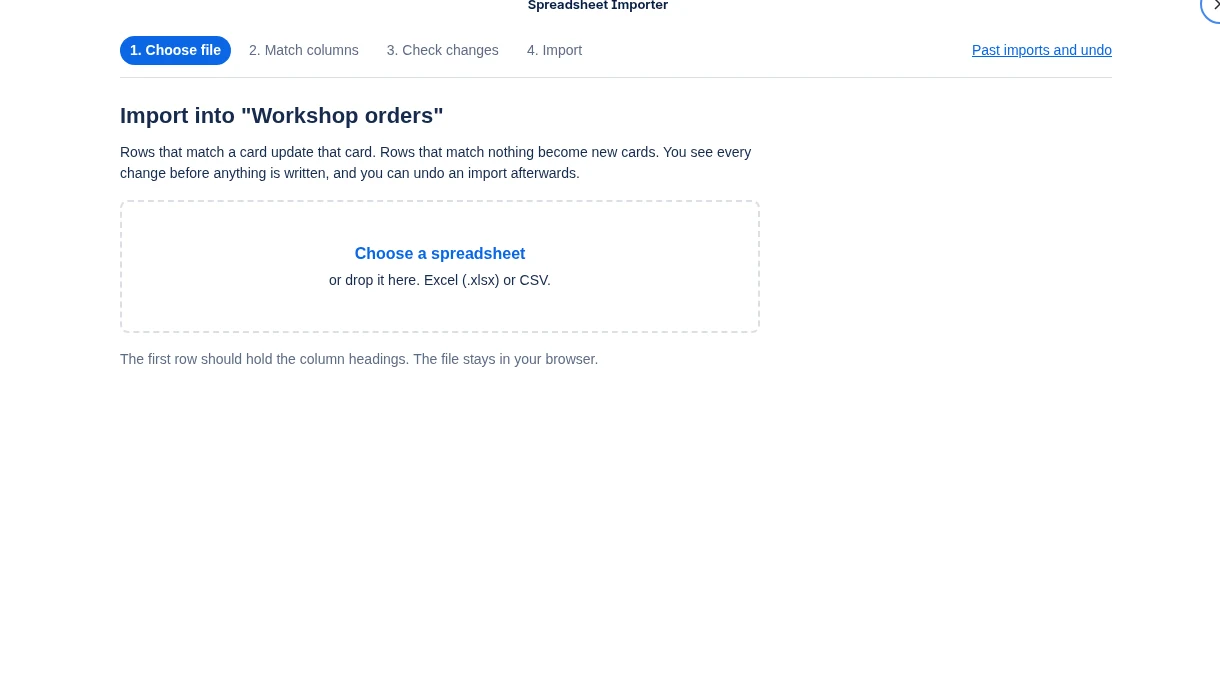
Choose your file
Open the importer from the top of your board and pick an Excel or CSV file. The first row should hold your column headings.
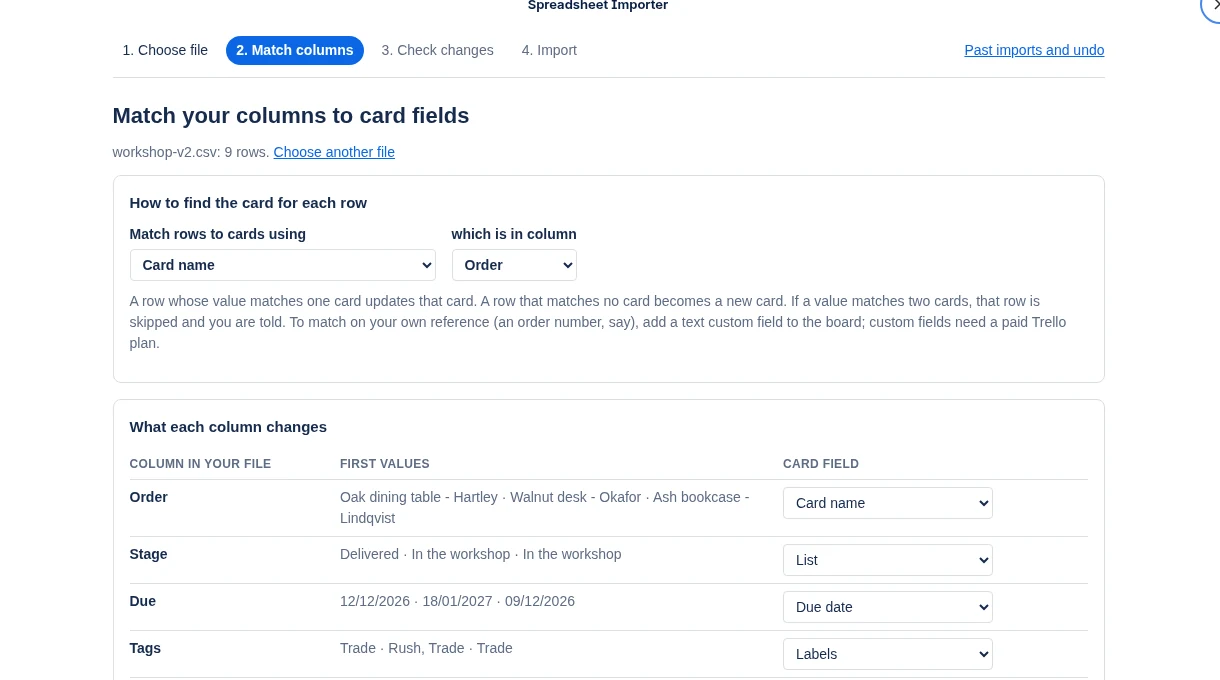
Match your columns
Say how to find the card for each row, and which column goes to which card field. Sensible matches are filled in for you and remembered for next time.
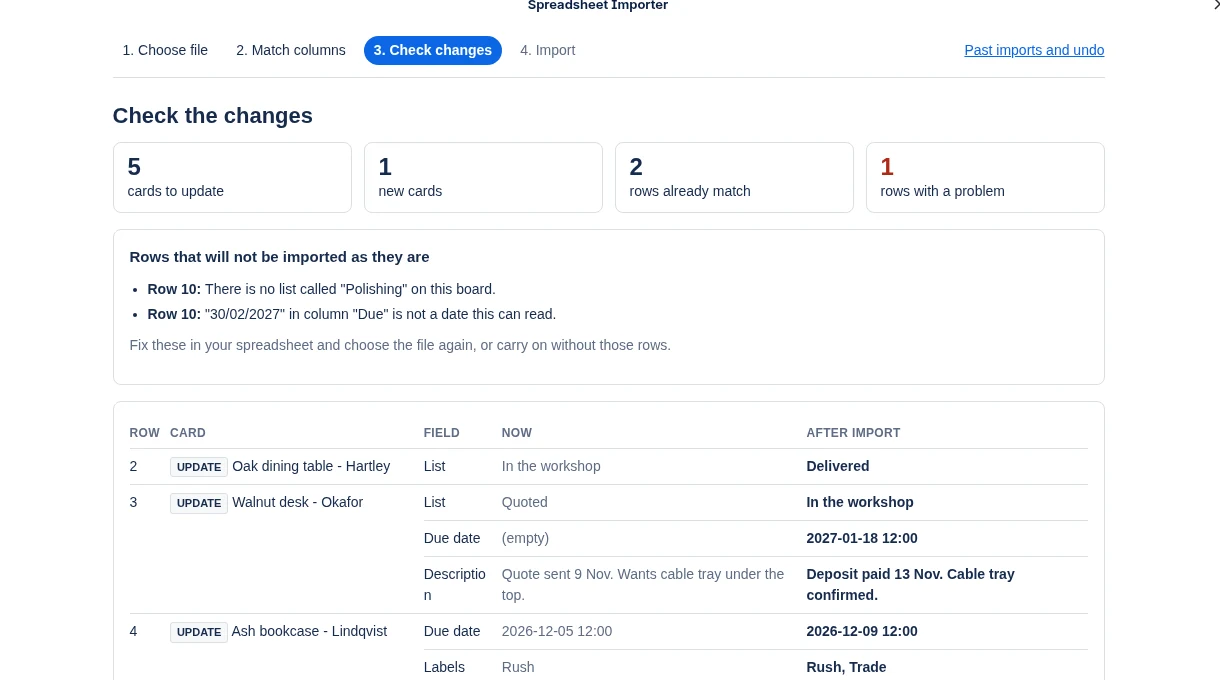
Check the changes
Every card that would change is listed, field by field, with what it holds now and what it will hold after. Rows with a problem are explained in plain words.
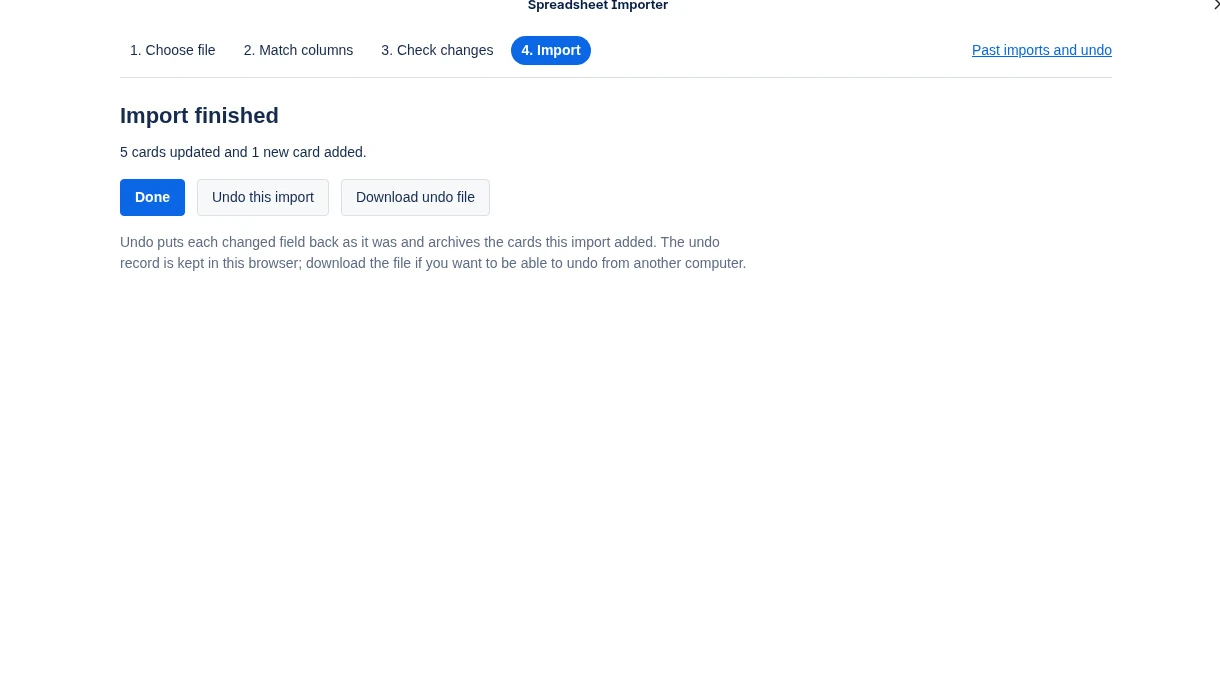
Import, and undo if you need to
The import paces itself to Trello's limits. Afterwards one button puts everything back as it was.
Pricing
Free to try properly. One flat price after that.
Free
$0
For small and occasional imports.
- Up to 25 rows per import
- As many imports as you like
- Every feature, including updates and undo
Workspace
$5 a month
One price for the whole Trello workspace.
- Imports of any size
- Every board in the workspace
- Every member, with no seats to count
- Cancel at any time
Payment is taken by Stripe. You subscribe from inside the Power-Up, and a workspace admin can change the card or cancel from the same place. If you cancel, it runs to the end of the month you have paid for.
Help
The rules it follows
The same rules every time, so you can predict what an import will do.
| In your spreadsheet | What happens |
|---|---|
| An empty cell | That field is left as it is. |
[clear] in a cell | That field is emptied on the card. |
| A value that matches one card | That card is updated. |
| A value that matches no card | A new card is made. If you match on a text or number custom field, the new card is given that value so the next import finds it. If you match on card number or card link, the row is skipped instead, since a new card cannot be given those. |
| A value that matches two cards, or appears twice in the file | The row is skipped and you are told which. |
| A list, label or member that is not on the board | The row is skipped and you are told why. Lists, labels and members are never created for you. |
| A Labels or Members cell | The card ends up with exactly the ones listed, separated by commas. Labels with no name are matched by colour. |
| A date with no time | Midday that day. If the card is already due at some time that day, it is left alone. |
Want to try it on a spare board first? Make three lists called Quoted, In the workshop and Delivered, import sample-orders.csv, then import sample-orders-week-2.csv to see cards updated instead of added again.
Fields it can set: name, description, list, due date, start date, due complete, labels, members, and custom fields (text, number, date, checkbox and dropdown).
Questions
Good to know
Does my spreadsheet get uploaded anywhere?
No. The file is read inside your browser. Card data goes between your browser and Trello directly. The only thing our server stores is which workspace has a subscription.
What permission does it ask for?
Trello asks you to allow the importer to read and change cards. Trello grants this for all the boards you can edit, because that is the only way it offers; the importer only works on the board you opened it from. You can disconnect it at any time from the Power-Up settings.
Does it work on a free Trello plan?
Yes. You can match cards by name, card number or card link. Matching on a custom field of your own needs a paid Trello plan, because custom fields do.
What is not imported?
Checklists, comments, attachments and card covers. Archived cards are not matched or changed.
Where is the undo record kept?
In the browser you imported from, for your last five imports per board. At the end of an import you can download an undo file, which lets you undo from another computer.
What if someone edits a card after the import?
Undo only puts back a field that still holds what the import wrote. Anything changed since is left alone and listed for you.
How do I cancel?
A workspace admin opens the importer, chooses "Past imports and undo", then "Manage or cancel". The subscription runs to the end of the month already paid for. If you subscribed and are not an admin, email us from the address on your receipt.
Something else? Write to support@stumason.dev.